
How to Build Multi-Agent Systems with AG2: A Simple Guide for Automation
Bahman
Published on Jun 03, 2025
Imagine having a system that not only understands your requests, but also processes data, generates reports, and writes social media posts—autonomously. At 1des, we use AG2 (AutoGen) to power such intelligent systems using AI agents. In this article, we’ll show you how to build one from scratch using Python.
Whether you're handling financial trades, automating data analysis, or building a notification pipeline, AG2 enables you to coordinate multiple AI agents working collaboratively to get the job done.
🔍 What is AG2 (AutoGen)?
AG2, also known as AutoGen, is a powerful framework for building multi-agent systems (MAS). In a MAS, multiple AI agents operate autonomously, yet collaboratively, to complete complex tasks. Each agent specializes in something and communicates with others to share progress or request help.
Key concepts in AG2:
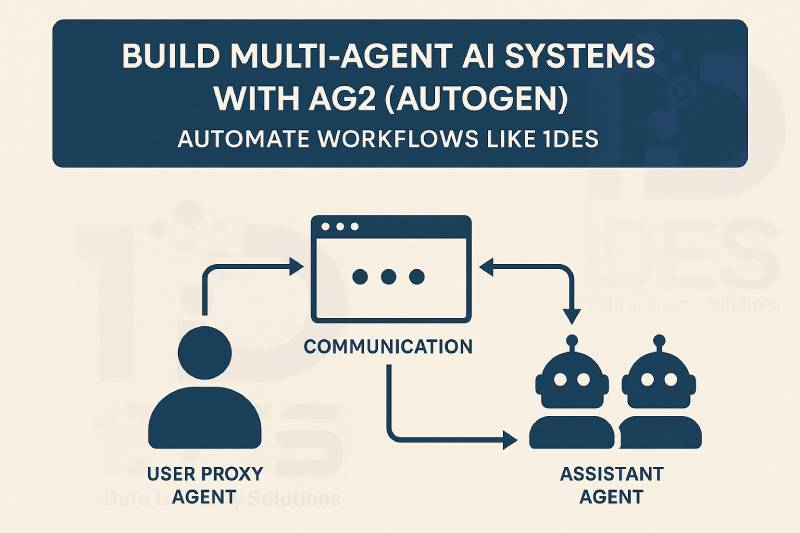
- Assistant Agents: Handle task execution (e.g., GPT-4 text generation, analysis).
- User Proxy Agents: Mediate between user and assistants, making interaction seamless.
- Communication: Agents can talk to each other to coordinate complex workflows.
⚙️ How AG2 Powers Automation at 1des
At 1des, we automate repetitive or high-effort processes using AG2. A common use case is automated trade reporting: when a crypto trade is closed, we generate a report, a tweet, a Telegram update, and a chart — all without human intervention.
Let’s walk you through how this works using a complete Python example.
🧪 Real-World Example: Trade Report Automation with AG2
✅ What it Does
- Takes in trade details.
- Uses AG2 agents to generate:
- A human-readable report
- A price movement chart
- A tweet-style summary
- A Telegram-ready message
💻 Full Code: AG2-Based Automation Pipeline
import matplotlib.pyplot as plt
from datetime import datetime
import autogen
from autogen import config_list_from_json, AssistantAgent

def generate_report_with_assistant(trade_details):
    config_list = config_list_from_json(env_or_file="OAI_CONFIG_LIST")
    assistant = AssistantAgent(name="report_writer", llm_config={"config_list": config_list})
input_text = "\n".join([f"- {k}: {v}" for k, v in trade_details.items()])
message = f"Generate a comprehensive market analysis report from the following trade details:\n{input_text}"

result = assistant.run(
    message=message,
    tools=assistant.tools,
    max_turns=2,
    user_input=False,
    summary_method="reflection_with_llm"
)
return result.summary

def plot_trade_prices(trade_details):
    open_time = datetime.strptime(trade_details["Open Time"], "%Y-%m-%d %H:%M:%S")
    close_time = datetime.strptime(trade_details["Close Time"], "%Y-%m-%d %H:%M:%S")
    open_price = float(trade_details["Open Price"])
    close_price = float(trade_details["Close Price"])
times = [open_time, close_time]
prices = [open_price, close_price]

plt.figure(figsize=(10, 6))
plt.plot(times, prices, marker='o', color='b', linestyle='-', linewidth=2, markersize=8)
plt.axhline(y=float(trade_details["Stop Loss Price"]), color='r', linestyle='--', label='Stop Loss')
plt.axhline(y=float(trade_details["Take Profit Price"]), color='g', linestyle='--', label='Take Profit')
plt.title(f"Trade Price Movement for {trade_details['Market']}")
plt.xlabel('Time')
plt.ylabel('Price')
plt.legend()
plt.grid(True)
plt.xticks(rotation=45)
plt.tight_layout()
plt.savefig("trade_price_movement.png")
print("✅ Plot saved as trade_price_movement.png")

def generate_tweet_from_assistant(report):
    config_list = config_list_from_json(env_or_file="OAI_CONFIG_LIST")
    assistant = AssistantAgent(name="tweet_writer", llm_config={"config_list": config_list})
    tweet = assistant.run(
        message=f"Convert this report into a concise tweet:\n{report}",
        tools=assistant.tools,
        max_turns=2,
        user_input=False,
        summary_method="reflection_with_llm"
    )
    return tweet.summary
def generate_telegram_message_from_assistant(report):
    config_list = config_list_from_json(env_or_file="OAI_CONFIG_LIST")
    assistant = AssistantAgent(name="telegram_writer", llm_config={"config_list": config_list})
    telegram = assistant.run(
        message=f"Convert this report into a concise Telegram message:\n{report}",
        tools=assistant.tools,
        max_turns=2,
        user_input=False,
        summary_method="reflection_with_llm"
    )
    return telegram.summary
def main():
    trade_details = {
        "Product": "badalona",
        "Trader": "badalona_long",
        "Market": "BTCUSDT",
        "Side": "Long",
        "Open Time": "2025-04-07 15:00:00",
        "Open Price": "79033.11",
        "Stop Loss Price": "78479.88",
        "Take Profit Price": "81404.1",
        "Close Time": "2025-04-07 15:08:02",
        "Close Price": "78430.48",
        "Closed by Stop Loss": "Yes",
        "Profited": "No",
        "Profit / Loss": "-0.76%",
        "Signal ID": "31"
    }
print("📄 Generating Report...")
report = generate_report_with_assistant(trade_details)
print("\n--- Generated Report ---\n", report)

print("\n📊 Generating Chart...")
plot_trade_prices(trade_details)

print("\n🐦 Generating Tweet...")
tweet = generate_tweet_from_assistant(report)
print("\n--- Tweet ---\n", tweet)

print("\n📣 Generating Telegram Message...")
telegram = generate_telegram_message_from_assistant(report)
print("\n--- Telegram Message ---\n", telegram)

if name == "main":
    main()
📌 Outcome
By combining multiple assistant agents, you now have:
- A full automation pipeline.
- Modular AI-driven components.
- Real-time reporting and publishing capability.
You can easily extend this to:
- Publish to Telegram or X (Twitter) using their APIs.
- Monitor trading bots in real-time.
- Trigger alerts or daily digests.
🧠 Final Thoughts
AG2 makes it incredibly easy to build systems where AI agents work together—each doing its part, sharing context, and coordinating in real time.
At 1des, AG2 helps us:
- Reduce human error.
- Save development and operational time.
- Stay agile in rapidly changing environments.
If you're building intelligent automation tools, multi-agent systems using AG2 can be a game changer.